
How can I add internal comments to an application and communicate with colleagues?

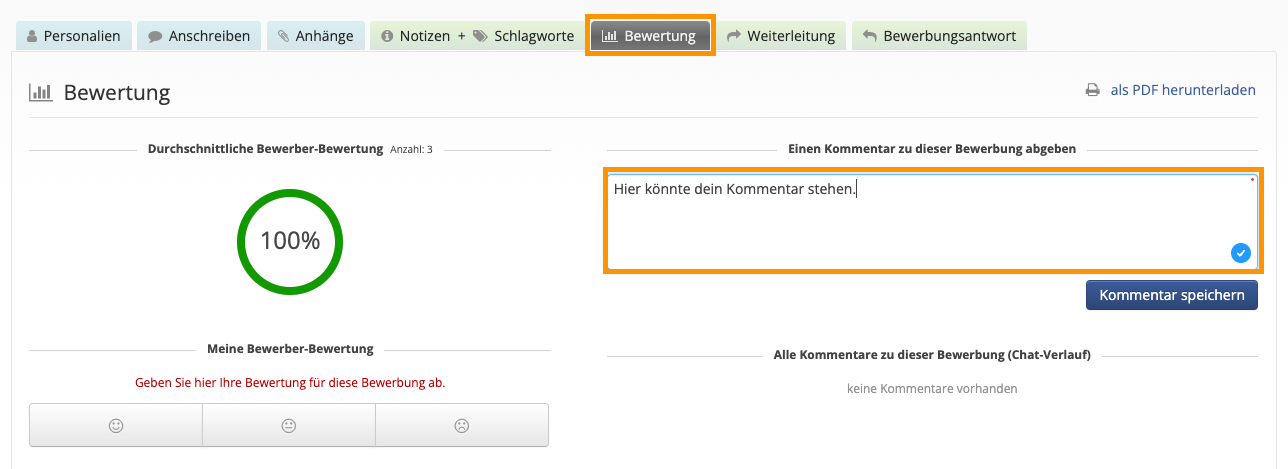
Open the corresponding application in Ostendis and switch to the “Evaluation” tab. There, you can write a comment in the text field to provide your assessment of the application. Your comments will automatically be tagged with your name and a timestamp. If you have questions for colleagues, you can ask them directly here. All involved HR managers and line staff can see the comments in a central location and respond to them, keeping the exchange clear.
Wie hilfreich war dieser Beitrag?

Topic Areas

First Steps
Get Started with Ostendis! Here you'll find everything you need for onboarding.
Account
All information about passwords, users & more related to your Ostendis account.
Job Advertisement & Multiposting
Create and publish your jobs quickly and efficiently.
Application Management
Discover the most important features of Ostendis and optimize your recruiting.
Technical
Solutions for technical questions, system requirements and integrations.
Login Ostendis (ODM)

Topic Areas

First Steps
Get Started with Ostendis! Here you'll find everything you need for onboarding.
Account
All information about passwords, users & more related to your Ostendis account.
Job Advertisement & Multiposting
Create and publish your jobs quickly and efficiently.
Application Management
Discover the most important features of Ostendis and optimize your recruiting.
Technical
Solutions for technical questions, system requirements and integrations.
Login Ostendis (ODM)