Whether your team members receive an email about a new comment or rating depends on two factors:
Personal notification settings
The way notifications are sent (automatic vs. manually triggered)
Automatic notifications for comments/ratings
When you add a comment or rating, Ostendis automatically creates an email notification – depending on personal settings:
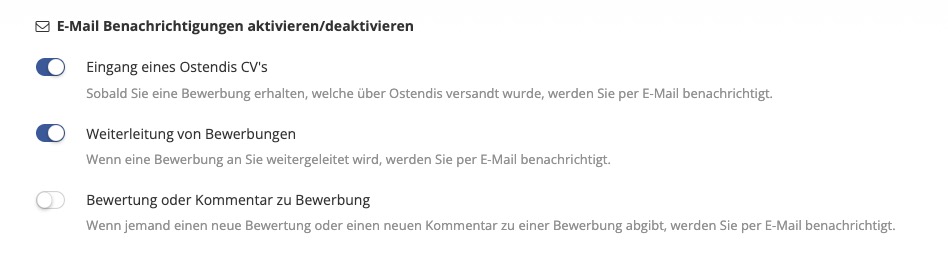
Each person can set whether they want to receive such emails:
Account → Settings → Email Notifications → “Rating or comment on application”If the notification is disabled, this person will not receive an email, but will still see the comment in the system.
IMPORTANT: Emails are not sent immediately, but are sent in batches every 5 minutes.
If multiple comments are added within these 5 minutes, only one email is sent – to avoid overloading inboxes.
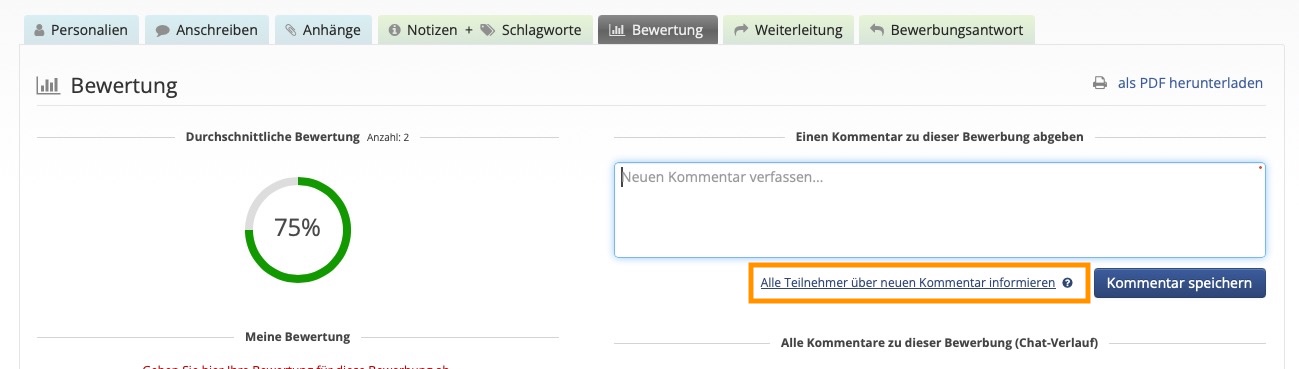
Notify immediately: "Notify all participants about new comment"
If you want to ensure that all team members receive an email immediately about the new comment, you can trigger this manually:
Below the comment field, you’ll find the button
“Notify all participants about new comment”.Once you click this, the email is sent immediately to all participants –
regardless of their personal notification settings.
This is especially helpful when a comment is important, urgent, or time-sensitive.
💡 In brief
- Standard: Sent every 5 minutes, only if the notification is enabled.
- Multiple activities within 5 minutes: Only one email is sent.
- “Notify all participants about new comment” button: → Immediate email to everyone, even if someone has otherwise disabled comment emails.
Wie hilfreich war dieser Beitrag?