Since 2018, the job notification obligation has applied to certain professions in Switzerland. From 2026, the list of notifiable professions will be significantly expanded. For many companies, this means more notifications to the RAV, a five-day blocking period, and consequently more administrative effort.
With the new RAV interface directly in Ostendis, this process is now greatly simplified and largely automated.
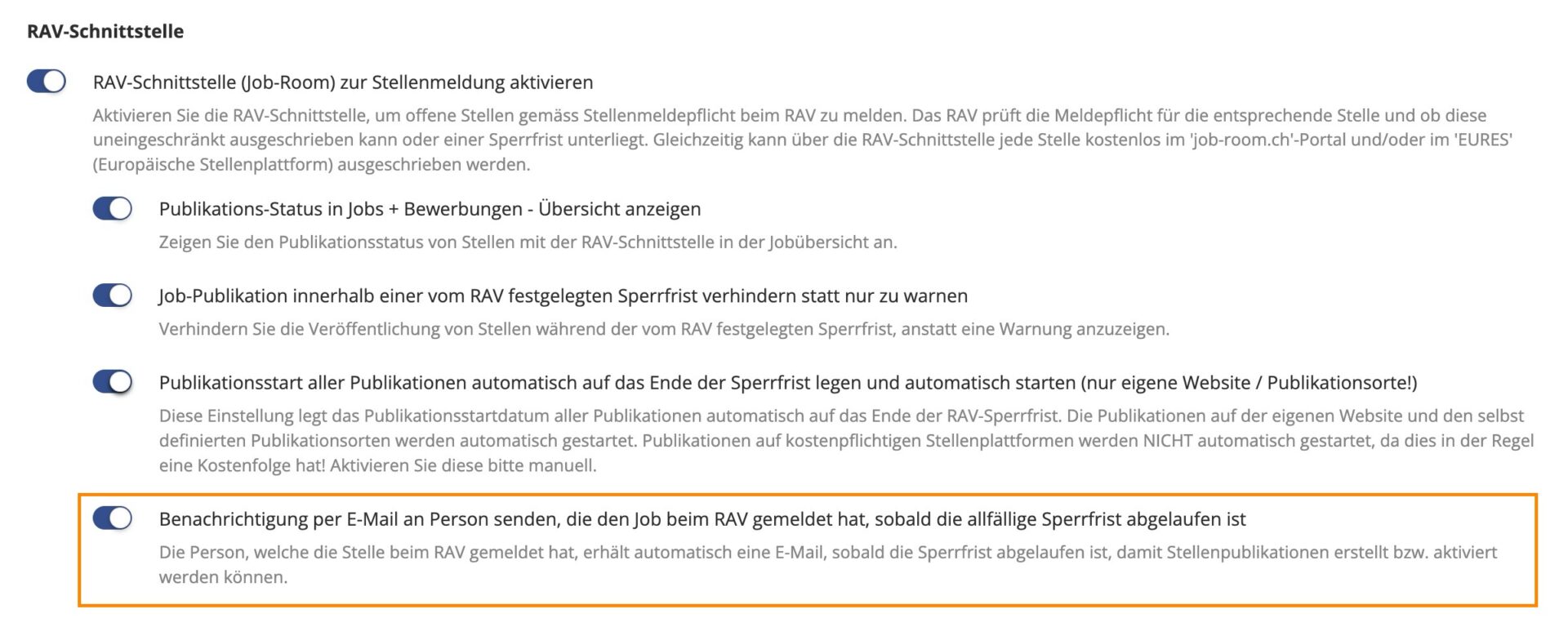
Settings - RAV Interface
Under Company → Settings, the RAV interface can be activated or deactivated, and further settings can be made (see image).
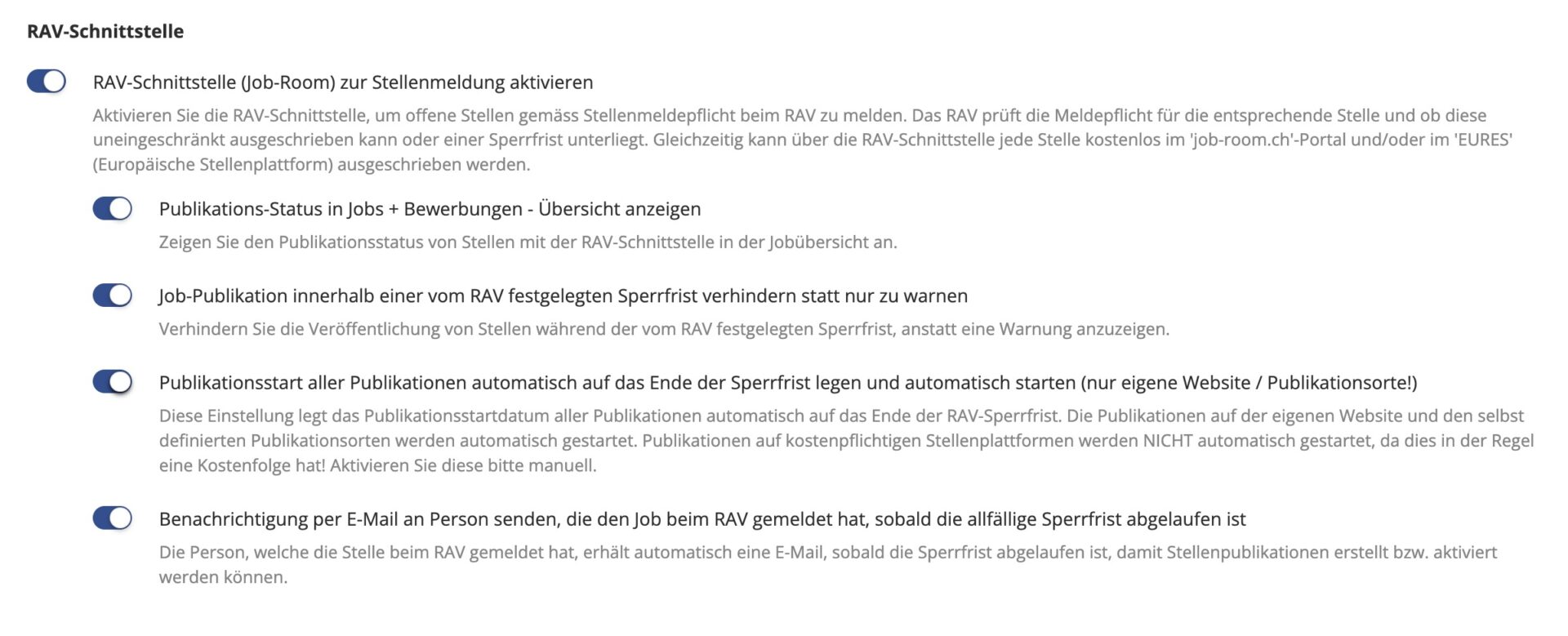
Important note: If automatic publication is activated after feedback from the RAV (second to last setting option), all publications can be prepared in advance. After the blocking period expires, all publications except paid ones will be automatically published. This saves you time and reduces your worries.
How the process works in Ostendis
1. Create Job
Create the job as usual and fill in as many job parameters as possible under Settings & Permissions.
Important: Ensure that the Workplace section is also filled in correctly. The SECO determines the responsible RAV based on this information. Therefore, always enter the actual workplace – not, for example, the address of the headquarters.
Afterward, it is recommended to immediately check whether the job is subject to notification. You can do this under the “RAV” tab in the “Profession List”.
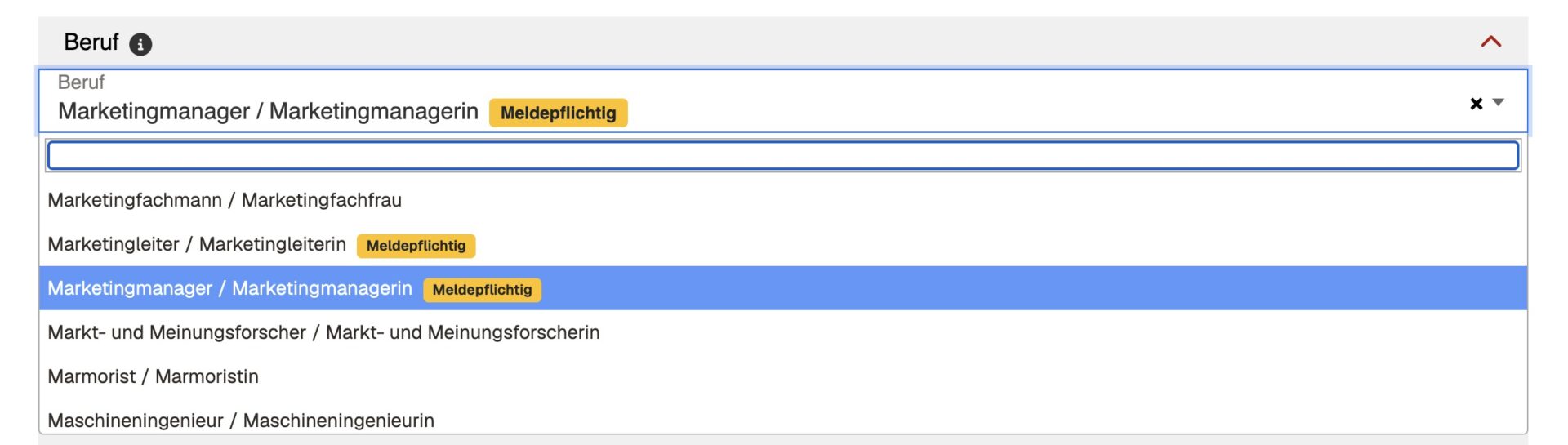
If the job is not marked as notifiable, you can create the advertisement as usual and publish it accordingly. If the profession is notifiable or if you want to publish the job in the Job-Room anyway, proceed as explained below.
Note: When in doubt, it is advisable to report the position as a precaution.
2. Create HTML Advertisement
To report the position to the RAV, an HTML advertisement must be created. Use our HTML ad editor or your existing HTML ad for this, as usual.
3. Publications
If the check in the RAV list (RAV tab in the job) shows that the position is notifiable, publications should not be published directly. In this case, the RAV form must be filled out and submitted.
Publications can be prepared but, as mentioned, should not yet be published. The start date can already be set. If a blocking period is reported by the RAV, this will be automatically updated.
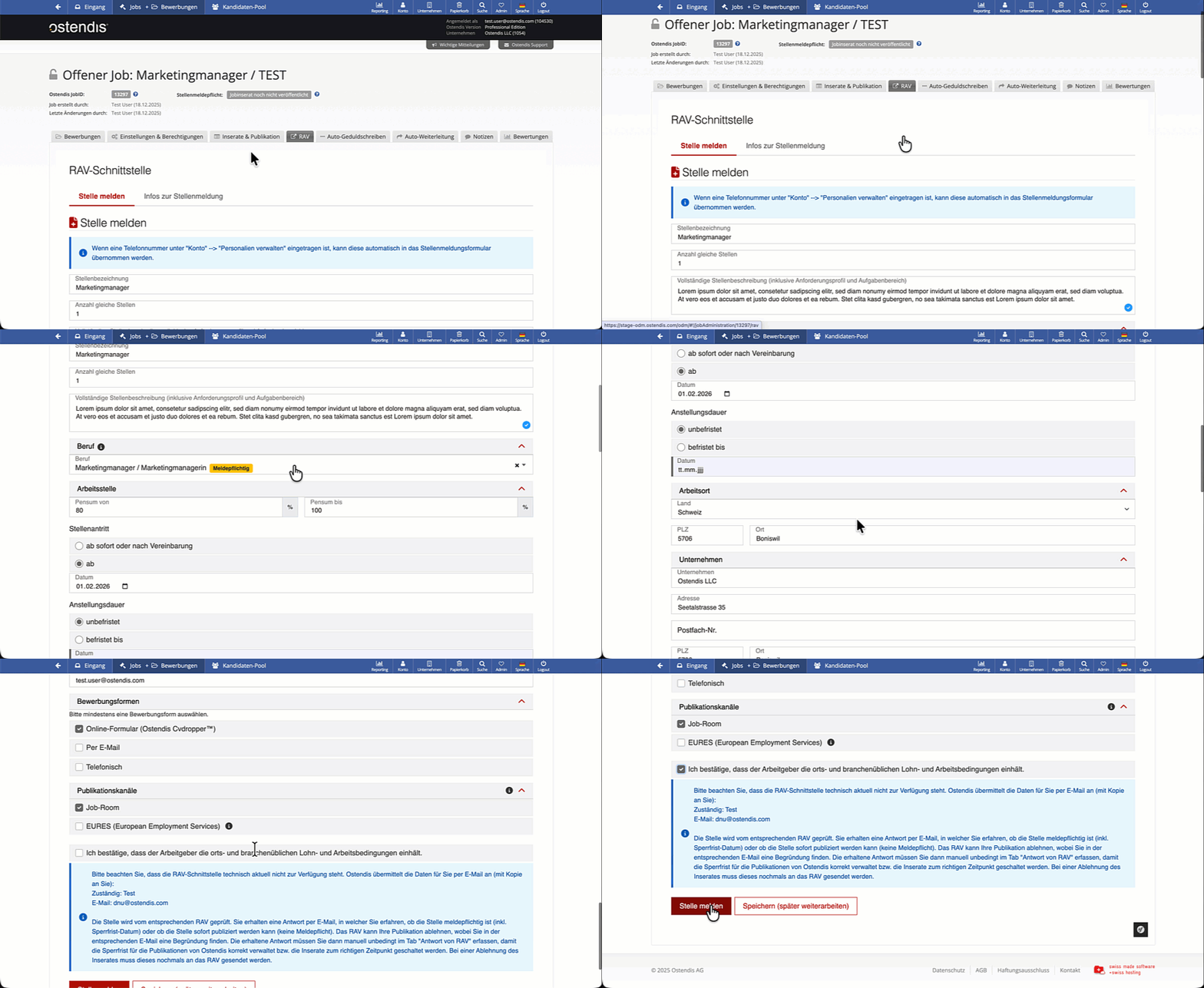
4. RAV Form
In the new “RAV” tab, Ostendis prepares the job notification form based on the information under Settings & Publication as well as the advertisement.
You can check, supplement, and then submit the information.
4. RAV – Automatic Feedback
Feedback from the RAV is processed and displayed directly in Ostendis. You can find the status in the job overview as well as in the job itself.
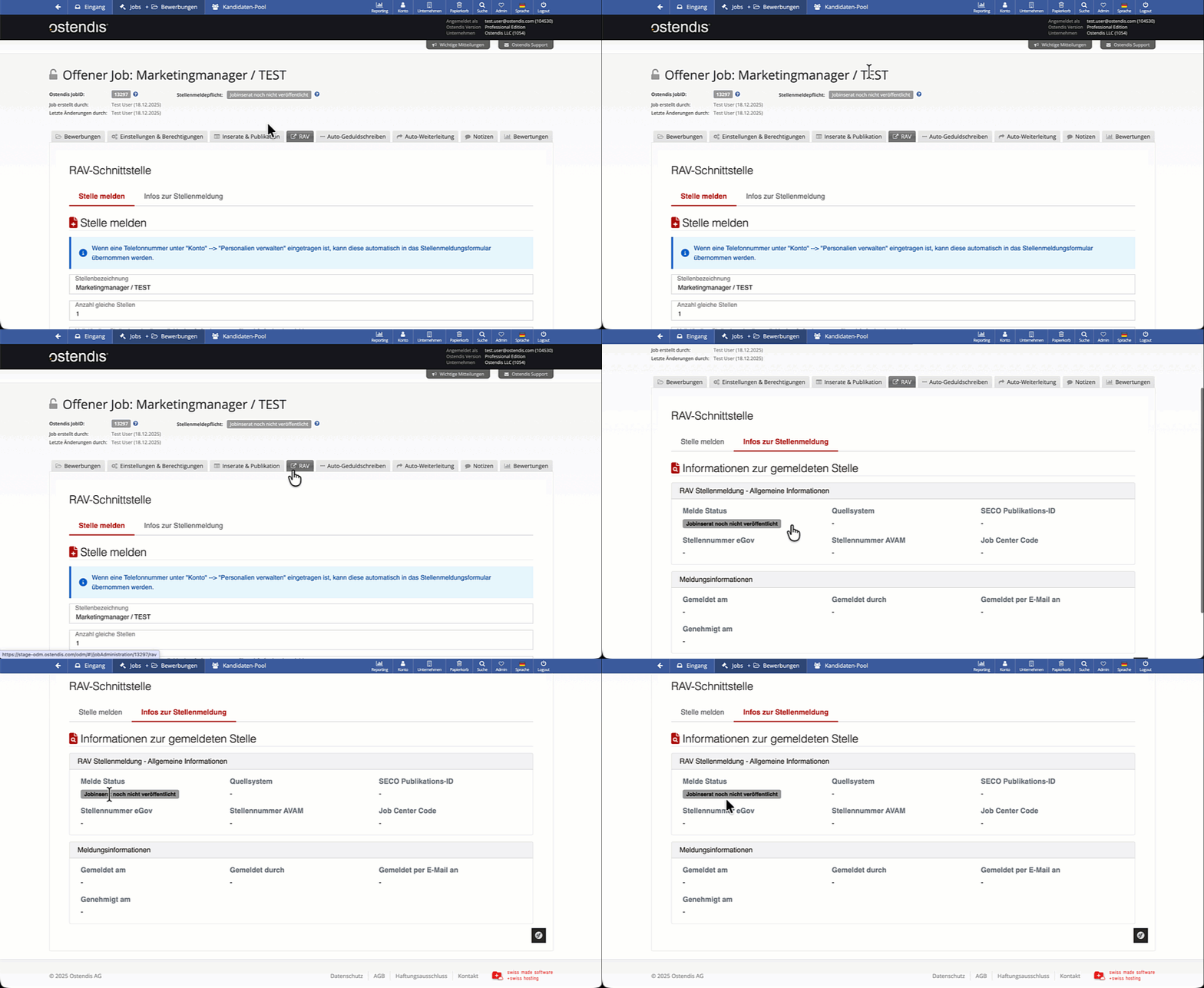
All possible statuses:
- Job advertisement not yet published: The job advertisement has not yet been published with the RAV.
- Job advertisement under review by RAV: The job advertisement is being reviewed by the RAV and must not be published yet!
- Job advertisement rejected by RAV: The job advertisement has been rejected by the RAV and must not be published before correction and re-review! You can find the reason under "RAV" --> "Job Notification Info".
- Restricted publication approval: The job is subject to notification. Advertisements for this job may only be published in the Job-Room until the end of the blocking period. Further information can be found under "RAV" --> "Job Notification Info".
- Unrestricted publication approval: The job is not subject to notification. Advertisements for this job may be published freely.
- Job advertisement publication ended: The publication has ended. The advertisement is no longer published in the Job-Room. Further information can be found under "RAV" --> "Job Notification Info".
- Job advertisement archived: The RAV publication has reached its maximum duration of 60 days and has been automatically archived. The advertisement is no longer published on Job-Room.
5. Blocking Period & Publication
After feedback from the RAV – whether notifiable or not – Ostendis automatically sets the start date of all publications (except paid ones like jobs.ch) to the day after the blocking period expires and publishes them (if activated in the settings).
If automatic publication was deactivated in the settings, publications must be published manually.
Email Notification
For positions with restricted publication, there is now an additional email notification.
As soon as a position is no longer considered “restricted publication,” it automatically changes to the “publicly published” status. At this moment, an email notification can optionally be triggered. This informs that the position can now be publicly published and the corresponding publications can be activated.
The email is sent exclusively to the person who originally reported the position to the RAV.
F.A.Q
How do I know if a job is subject to notification? Where can I check this?
Enter the job title in the job under the “RAV” tab in the “Profession List”. A yellow message appears after the job title: “Subject to notification”. For professions that are not subject to notification, nothing is listed after the title.
Can I voluntarily report a job to the RAV even if it is not subject to notification?
Yes. When in doubt, it is advisable to report the position as a precaution. If you want the position to be published in the Job-Room anyway, you must also fill out and submit the RAV form. Don’t forget to check the “Job-Room” box under publication channels in the RAV form.
Why do I absolutely need an HTML advertisement?
An HTML advertisement is mandatory for reporting a position to the RAV, as Ostendis creates the official job notification form based on the advertisement content and job parameters under the settings. Without an HTML advertisement, the position cannot therefore be submitted to the RAV.
How does automatic publication work after the blocking period expires?
Go to Company ➡️ Settings ➡️ RAV Interface and activate the second to last option (automatically set the publication start of all publications to the end of the blocking period and start automatically). Note: After the blocking period expires, all stored or prepared publications that do not incur additional costs will be automatically activated. Paid publications must be started manually. Therefore, always check the existing publications of an advertisement.
Can I make changes to the submitted data after reporting the job to the RAV?
As long as the job advertisement has the status “under review by RAV”, no content changes can be made. If an advertisement is rejected by the RAV, it must be resubmitted.
Can I withdraw or cancel an RAV notification?
An already submitted RAV notification cannot be withdrawn or canceled as long as it is under review by the RAV. If the notification was submitted accidentally or with incorrect information, it is advisable to contact the responsible RAV directly. If the advertisement has been published, the publication can be ended by stating a reason.
I selected the wrong profession – can I correct this?
As long as the RAV notification has not yet been submitted, the profession can be adjusted at any time. If the position has already been submitted to the RAV, it is no longer possible to correct the profession. In this case, the position usually has to be reported again. When in doubt, it is advisable to consult with the responsible RAV before submitting a new notification.
Where can I see the current RAV status of my job?
The current RAV status is displayed in the job overview, in the job to the right of the job ID, and directly in the job under the “RAV” tab | “Job Notification Info”.
Who is responsible for the correctness of the data?
The responsibility for the correctness and completeness of the submitted data lies entirely with the reporting company. Ostendis provides the technical platform and transmits the information entered by the customer to the RAV, but assumes no liability for content errors, incorrect profession assignments, or legal consequences. It is recommended to carefully check all information before submitting the RAV notification.
Wie hilfreich war dieser Beitrag?